


Hugi: Meet Real Local People
4.13.79K Reviews
App Specs
- Version
- 1.6.4
- Updated On
- License
- Free
- Downloads
- 1,000,000+
- Developer
- Interactive Zone Limited
- Categories
- Social
- Platform
- Android
Screenshots


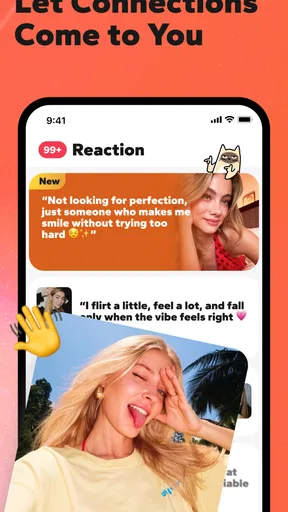



 Analysis by AppCompare
I approached Hugi: Meet Real Local People as a dating app for people who want conversations with nearby users rather than an endless stream of distant profiles. It sits in the social category, is made by Interactive Zone Limited, and is free to download, although optional purchases range from $0.99 to $499.99 per item. That price range is worth noticing before you spend anything, especially if you tend to explore premium options quickly.
My first impression is that Hugi is trying to keep dating more personal and local. That makes it appealing if your main goal is to meet someone in your area, but it also means your experience will depend heavily on how active the nearby community is. A dating app can have a polished presentation and still feel quiet if few suitable people are around you. I would treat Hugi as an app to test patiently, not as a guaranteed shortcut to a relationship.
How Hugi feels during everyday use
The app’s central idea is easy to understand: meet real local people, discover possible matches, and begin conversations. I like that focus because it gives the service a practical purpose. If a connection develops, distance is less likely to become an immediate obstacle than it would be on a platform built around broad discovery.
Hugi is aimed at mature users, with a 17+ content rating. That does not remove the need for good judgment. I would still keep early conversations inside the app, avoid sharing sensitive personal details too quickly, and arrange a first meeting in a public place. The local angle can make a meeting feel more realistic, but it can also make privacy decisions more important because people may live closer than expected.
In terms of speed, I would set moderate expectations rather than assuming every screen will feel instant on every phone. The app is available on devices running Android 8.0 or later, which covers many older phones but does not guarantee the same experience across them. A newer device with plenty of free storage and a stable connection should be the more comfortable choice for browsing and messaging.
What matters most here is not a flashy opening animation or a complicated set of tools. It is whether profiles appear smoothly, whether conversations remain easy to follow, and whether the app helps you move from browsing to a meaningful exchange. Hugi’s local positioning is strongest when you use it with a clear idea of the kind of person you would genuinely be willing to meet.
What happens when you use it heavily
Dating apps can become demanding during longer sessions because browsing, loading profile images, switching between discovery and messages, and keeping several conversations active all create more work for a phone and a network connection. I would not judge Hugi only by a quick opening check. A better test is to use it during a normal evening: browse for a while, return to messages, pause, and come back later.
Worth Reading Before You Choose

EA SPORTS FC Mobile 26 Is a Bigger Football Game, but It Takes Time

Flipboard Shows What News Apps Must Do Beyond the Feed

Switching to Android Auto Means Rethinking Your Driving Routine

Google Calendar Makes a Crowded Week Easier to Manage

Ludo King Makes the Most of the Minutes Between Plans

Baby Panda World Brings Quick Play to Modern Phones, but Its Game Library Feels Busy
My practical advice is to avoid treating the app like a slot machine. Constantly refreshing profiles can make any dating service feel slow, repetitive, or frustrating, especially when the local pool is limited. Short, intentional sessions are more useful. I would spend a few minutes reviewing profiles carefully, respond to conversations that show genuine potential, and leave when the available choices stop feeling relevant.
That approach also helps with battery and data use. I would use a reliable Wi-Fi connection for longer browsing and avoid judging the app while a phone is already struggling with many background tasks. If your device is nearly full, several apps are updating, or the connection is unstable, delays may look like an Hugi problem when they are really caused by the wider phone environment.
A less obvious trade-off is that a local service can feel faster in one sense and slower in another. You may spend less time dismissing people who live far away, but you could also reach the end of the useful nearby selection sooner. That is not necessarily a technical failure. It is the natural result of narrowing discovery to people who may be realistically accessible.
Stability, interruptions, and getting back to a conversation
Reliability matters more in a dating app than it first appears. A missed message, a delayed profile load, or an interrupted conversation can change the tone between two people. I would therefore judge Hugi by how easily I can return to a conversation after closing the app, switching to another task, or losing a connection briefly.
For a realistic everyday scenario, imagine checking Hugi during a lunch break, starting a conversation, then putting the phone away for the afternoon. When you return, the useful experience is being able to find that exchange without unnecessary searching and continue naturally. I would also avoid sending a sensitive or emotionally important message while the connection is unreliable; wait until the app and network are behaving normally.
If an interruption occurs, my first recovery step would be simple: check the connection, close and reopen the app if a screen appears stuck, and make sure the phone has enough free space. I would not repeatedly tap buttons or resend a message immediately, because that can create confusion if the first action eventually completes. This is ordinary troubleshooting, but it is especially helpful in a messaging-focused app.
The current version is 1.6.4, so the experience may improve as the developer continues maintaining it. I would keep the app updated through the normal store process, particularly if I notice repeated loading problems. Updates can also change how familiar screens behave, so after an update I would take a moment to review the interface before relying on it for an important conversation.
Hugi has attracted more than a million installs, with an average rating of 4.1 from roughly thirty-six thousand ratings and about four thousand written reviews. Those figures suggest a substantial audience and a generally positive reception, but they should not be mistaken for a promise that the local community in your area will be equally active. Location, age range, preferences, and timing can make the app feel very different from one person to another.
Older phones and practical device limits
The Android 8.0 minimum is useful because it leaves the door open to older hardware. Still, operating-system compatibility is only the starting point. An older phone may have less memory, a slower processor, a weaker battery, or limited storage. Those factors can affect image loading, app switching, and the time needed to resume a session.
If you are using an older device, I would make three small adjustments. First, keep some storage free instead of allowing the phone to operate at its limit. Second, close demanding apps before a long browsing session. Third, use a stable connection when possible. These steps do not add features, but they make it easier to tell whether a problem is caused by Hugi or by the device.
People who rely on an entry-level phone should also be realistic about multitasking. Moving repeatedly between Hugi, a browser, a photo app, and messaging may cause the phone to reload screens. That can feel like lost progress even when the app itself is functioning normally. If your phone frequently refreshes apps in the background, finish one task at a time and return to Hugi deliberately.
I would also avoid judging the service solely by how quickly the first session begins. A dating app can open quickly but still become awkward when many images load or when several conversations are active. Conversely, a brief delay on an older device may be acceptable if the app recovers cleanly and the core exchange remains dependable.
Where it fits among familiar dating alternatives
Compared with broad dating platforms, Hugi’s main distinction is its emphasis on local people. That can be a real advantage for someone who wants practical possibilities rather than matches scattered across a large region. It may also feel less useful to travelers, people in sparsely populated areas, or anyone who prefers a very large international pool.
Compared with social networks, Hugi is more focused. A general social service may offer more ways to follow interests, join communities, or keep up with existing contacts, while Hugi is built around meeting and matching. I would choose Hugi when dating is the specific task. I would choose a broader social platform when I want conversation without the expectation that every interaction is romantic.
Compared with apps known for highly detailed filters or specialized communities, Hugi may be a better fit for someone who wants a simpler local starting point. It is less suitable if you already know that you need very specific matching criteria, a tightly defined community, or a large number of advanced discovery controls. In that case, another dating service may reduce the amount of manual sorting.
There is also a social trade-off. Local discovery can make a promising match feel more attainable, but it can make rejection or awkward encounters feel closer to home. I would use a respectful tone, avoid rushing into personal details, and remember that a nearby match is not automatically a compatible one. Location should reduce travel difficulty, not replace careful judgment.
Money, expectations, and a sensible routine
Hugi is free to download, which makes trying it relatively straightforward. The optional purchase range is much wider than a casual user might expect, extending from $0.99 to $499.99 per item. I would be especially careful here: read each purchase screen slowly, decide what you are actually trying to achieve, and set a personal spending limit before experimenting with paid options.
I would not pay simply because a quiet session feels disappointing. First, give the free experience enough time to show whether suitable local people are active in your area. If the nearby pool is small or conversations do not develop, spending more may not solve the underlying issue. Money can increase access to options in some apps, but it cannot manufacture mutual interest or guarantee a meaningful match.
A useful routine is to complete your profile honestly, check the app at times when you can answer thoughtfully, and focus on a few promising conversations instead of trying to contact everyone. The strongest benefit of a local dating app comes from relevance, not volume. A short message that refers to something specific in a person’s profile is usually more useful than sending the same opening line repeatedly.
Another practical tip is to decide in advance what information you will keep private during the first few exchanges. Do not share your home address, workplace details, financial information, or personal documents. If someone pushes for money, urgent secrecy, or a meeting in an isolated place, I would end the conversation and use the app’s available safety controls if appropriate.
Who should try it, and who should skip it
I think Hugi is worth trying if you want a free starting point for meeting people nearby and you are comfortable judging the service by the quality of local activity rather than by the size of its overall audience. It is also a reasonable option if distance has made other dating apps impractical or if you prefer a focused dating environment over a general social network.
I would be more cautious if you live somewhere with a small population, want a highly specialized dating community, or expect a constant stream of new profiles. The local emphasis may narrow your choices quickly. I would also skip it if you dislike managing in-app spending or if the 17+ mature audience does not match what you are looking for.
People with older Android phones can try it, but they should keep their expectations tied to their hardware. If your phone already struggles with image-heavy apps, switching between screens, or maintaining background sessions, Hugi may feel less comfortable than it does on newer equipment. In that situation, a lighter or more established alternative could be a better daily tool.
My performance verdict
After weighing the local focus, device requirements, audience size, and purchase model, I see Hugi as a focused dating option rather than a universal replacement for every familiar alternative. Its strongest idea is practical: help people look for connections that may be possible in real life, not only interesting on a screen.
The experience will depend on your location and on how well your phone handles browsing and messaging. I would use short sessions, keep the app updated, protect personal information, and avoid spending until I knew the free experience had enough local value. Those habits make the app easier to assess fairly.
My honest recommendation is to try Hugi with realistic expectations: judge the quality of nearby conversations, not just the number of profiles. If local discovery is what you want, it deserves a place in your testing list. If you need a huge audience, detailed niche matching, or a very predictable stream of activity, another dating app may suit you better.
Pros
- Encourages face-to-face connections with people nearby.
- Simple interface makes discovering local users quick.
- Useful for finding activity partners with shared interests.
- Location-based matching can make conversations more relevant.
- Offers an alternative to traditional dating and social apps.
Cons
- Some areas may have too few active users.
- Location sharing can raise privacy concerns for cautious users.
- Meeting strangers requires careful planning and personal safety.
- The quality of matches may vary by profile activity.
- Some features may depend on permissions or in-app purchases.
FAQs for Hugi: Meet Real Local People
What is Hugi: Meet Real Local People used for?
Hugi: Meet Real Local People is designed to help users discover and connect with people nearby or in places they plan to visit. The app focuses on local social interaction, making it possible to meet residents, find conversation partners, exchange recommendations, and potentially arrange activities. It may be useful for travelers, newcomers, or anyone who wants to expand their social circle beyond existing contacts.
How does Hugi help users find local people?
After creating a profile, users can generally browse or discover other members based on location and shared interests. Depending on the available features and privacy settings, Hugi may show profiles, conversations, or opportunities to interact with people in a selected area. The quality of results depends on how active the local community is, so the experience may vary considerably between cities and regions.
Is Hugi: Meet Real Local People safe to use?
As with any social or location-based app, users should take sensible precautions. Avoid sharing your home address, financial information, passwords, or other sensitive details, and be cautious when communicating with strangers. If you decide to meet someone, choose a busy public location, tell a trusted person about your plans, and use the app’s reporting or blocking tools when a profile or conversation feels suspicious.
Does Hugi require location access or personal information?
The app may request information such as your name, age, profile photo, interests, and approximate location to support profile discovery and local connections. Location permission can improve recommendations, but users should review the permission choices during setup and in their device settings. Only provide details you are comfortable sharing, and check Hugi’s current privacy policy before creating an account.
Is Hugi free, and are there any age requirements?
Hugi may offer free access to its core social features, while some functions could depend on optional purchases, subscriptions, or limits set by the developer. Availability can vary by platform, country, and app version, so review the store listing and in-app payment information before subscribing. Users should also confirm the current minimum age requirement and follow all applicable safety guidelines.


